Random Posts

Showing posts with label 9th 2020. Show all posts

Friday, July 10, 2020

Live Home 3D for Mac


Live Home 3D for Mac, a successor of Live Interior 3D, is the powerful yet intuitive home design software that lets you build the house of your dreams right on your Mac. It doesn't matter whether you're a homeowner who is planning some upcoming home improvements or a professional interior designer trying to bridge the gap between ideas and visualization. Live Home 3D can help you.J


  • Features and Highlights

Work in 2D and 3D EnvironmentLive Home 3D for macOS helps you to draft detailed 2D floor plans and automatically build the structure in 3D. You can trace the imported floor plan or start from scratch using the program smart tools.

Apply Materials and Add FurnitureYou can design and decorate the interior by optimizing the furniture arrangement and making smart color decisions. The app turns the process of room decoration into fun.

Rich Object CollectionsYou can choose from a built-in library of couches, chairs, kitchen sets, appliances, doors, and other items. What’s more, integration with Trimble 3D Warehouse™ allows you to download thousands of free 3D models from the online storage.

Results You Can UseMake changes to your home design project and share the results with clients, colleagues, friends, and family. Set up a custom camera angle and export the view to JPEG, TIFF, PNG, and BMP. Render a 3D video walkthrough and share on YouTube or Vimeo. Create 360° Panorama JPEG images or 360° videos.

Create 2D Floor PlansStart your interior design project by drawing a 2D floor plan with intuitive, point-and-click drafting tools. Measure out rooms and walls in just a couple of clicks. Add furniture, doors and windows. Set cameras and movie tracks to shoot the interior design views.

Furniture and Material CollectionsFigure out the furniture arrangement and color scheme of any room before lifting a single finger or ordering paint. Drag and drop furniture, decorations, doors, and more from library of over 1,500 objects and easily change the fabrics, colors, and finishes using over 2,100 included materials.

Export OptionsYour work lives both inside and outside of LiveHome 3D for macOS. You can make changes in the app and share the results with clients, colleagues, friends, and family.

Floor Plans, Screenshots and VideoYou will be able to export a floor plan in PDF, JPEG, 360° Panorama JPEG, TIFF, PNG or BMP file format. You can also export a snapshot of your interior view to JPEG, TIFF, PNG, and BMP. It is easy to set a camera path and to record a 3D video walkthrough of the project, including 360° videos for sharing on Facebook or Youtube.

Note: In demo version, save function is disabled. Requires 64-bit processor.

Also Available: Download Live Home 3D for Windows

Thursday, July 9, 2020

Live Home 3D for Mac

Live Home 3D for Mac, a successor of Live Interior 3D, is the powerful yet intuitive home design software that lets you build the house of your dreams right on your Mac. It doesn't matter whether you're a homeowner who is planning some upcoming home improvements or a professional interior designer trying to bridge the gap between ideas and visualization. Live Home 3D can help you.
  • Features and Highlights

Work in 2D and 3D EnvironmentLive Home 3D for macOS helps you to draft detailed 2D floor plans and automatically build the structure in 3D. You can trace the imported floor plan or start from scratch using the program smart tools.

Apply Materials and Add FurnitureYou can design and decorate the interior by optimizing the furniture arrangement and making smart color decisions. The app turns the process of room decoration into fun.

Rich Object CollectionsYou can choose from a built-in library of couches, chairs, kitchen sets, appliances, doors, and other items. What’s more, integration with Trimble 3D Warehouse™ allows you to download thousands of free 3D models from the online storage.

Results You Can UseMake changes to your home design project and share the results with clients, colleagues, friends, and family. Set up a custom camera angle and export the view to JPEG, TIFF, PNG, and BMP. Render a 3D video walkthrough and share on YouTube or Vimeo. Create 360° Panorama JPEG images or 360° videos.

Create 2D Floor PlansStart your interior design project by drawing a 2D floor plan with intuitive, point-and-click drafting tools. Measure out rooms and walls in just a couple of clicks. Add furniture, doors and windows. Set cameras and movie tracks to shoot the interior design views.

Furniture and Material CollectionsFigure out the furniture arrangement and color scheme of any room before lifting a single finger or ordering paint. Drag and drop furniture, decorations, doors, and more from library of over 1,500 objects and easily change the fabrics, colors, and finishes using over 2,100 included materials.

Export OptionsYour work lives both inside and outside of LiveHome 3D for macOS. You can make changes in the app and share the results with clients, colleagues, friends, and family.

Floor Plans, Screenshots and VideoYou will be able to export a floor plan in PDF, JPEG, 360° Panorama JPEG, TIFF, PNG or BMP file format. You can also export a snapshot of your interior view to JPEG, TIFF, PNG, and BMP. It is easy to set a camera path and to record a 3D video walkthrough of the project, including 360° videos for sharing on Facebook or Youtube.

Note: In demo version, save function is disabled. Requires 64-bit processor.

Also Available: Download Live Home 3D for Windows

Tuesday, June 9, 2020

iMyFone iBypasser

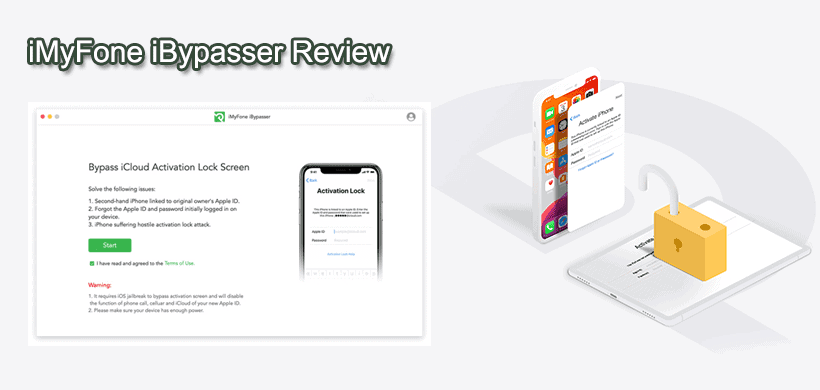
With iMyFone iBypasser for PC you can easily bypass iCloud activation lock on iPhone, iPad or iPod touch to access your locked iDevice! Bypass iCloud Activation Lock Screen desktop app without Password!

Locked out of the Activation Lock screen on iPhone, iPad or iPod touch? Don't know the Apple ID & password? Don't worry! iMyFone iBypasser helps you bypass iCloud Activation Lock without passcode and Apple ID easily and quickly. You will be able to enter the locked device and use it.

After bypassing activation lock with iBypasser for Windows PC, the iPhone/iPad/iPod touch will be jailbroken. You can access the device again for daily use except for the function of phone call, cellular and iCloud of your new Apple ID.
The activation lock screen will appear again if you reset your device after bypassing. You can use iBypasser on the same device for unlimited times before the license expires.
  • Bypass activation lock and get into your iOS device again.
  • Use a new Apple ID on your device.
  • iDevice won't be tracked by the previous Apple ID.
  • iDevice won't be remotely blocked or erased by the previous Apple ID user.
With this powerful iCloud Activation Screen bypass app, you can now access your iPhone and use it. You can log in a new Apple ID and enjoy the iOS features. Use the device without worries about the potential hazards from the previous Apple ID.

iCloud Activation Lock appears if you reset your iOS device without logging out the Apple ID when Find My [device] is turned on. iMyFone iBypasser can just bypass the lock screen no matter how you are locked out of it. It works in any scenarios including the ones below.

Note: The demo version lets you see the function and check if your device is supported. You need to purchase a license to bypass iCloud activation lock on your PC device.

Also Available: Download iBypasser for Mac

Sunday, May 10, 2020

Spirit of the North

Spirit of the North Cover, Poster, Full Version, PC Game, Download Free
Spirit of the North Game – Overview – Free Download – PC – Compressed – Specs – Screenshots – RIP
Type of game: Adventure
PC Release Date: May 7, 2020
Developer/Publishers
Infuse Studio, Merge Games
Spirit of the North (3.4 GB) is an Adventure video game. Developed and published by Infuse Studio, Merge Games. It was released on May 7, 2020 for Windows. Spirit of the North is a single-player 3rd-person adventure game inspired by the breathtaking and mysterious landscapes of Iceland. Play as an ordinary red fox whose story becomes entwined with the guardian of the Northern Lights, a female spirit fox.
Before downloading make sure that your PC meets minimum system requirements.
Minimum System Requirements
  • OS: Windows 10 (64-Bit)
  • Processor: Intel Core i5-4460 or equivalent
  • Memory: 8 GB RAM
  • Graphics: NVIDIA GeForce GTX 960 or equivalent
  • DirectX: Version 11
  • Storage: 4 GB available space
Screenshots
Spirit of the North Screenshot 1, Full Version, PC Game, Download Free
Spirit of the North Screenshot 2, Full Version, PC Game, Download Free
Spirit of the North Screenshot 3, Full Version, PC Game, Download Free
How to Install?
  1. Extract the file using Winrar. (Download Winrar)
  2. Open “Spirit of the North” folder, double click on “Setup” and install it.
  3. After installation complete, go to the folder where you extract the game.
  4. Open “HOODLUM” folder, copy all files and paste it where you install the game.
  5. Then double click on “Infused” icon to play the game. Done!
How to Download?If your don’t know how to Download this game, just Click Here!
Spirit of the North Download
Click Here to Download This Game
Game Size: 3.4 GB

Friday, April 10, 2020

AnyDesk

AnyDesk is the fastest remote desktop software on the market. It allows for new usage scenarios and applications that have not been possible with current remote desktop software. Access all your programs, documents and files from anywhere, without having to entrust your data to a cloud service. All you need to do to get started is to download and launch the 1.2 MB program file. No installation or (network) configuration required. Any Desk is the fastest free remote desktop software on the market.

Features and Highlights

FramerateIt transmits 60 frames per second over local networks and many internet con­nec­tions. This is much more than any com­pe­ting remote desktop application and makes on-screen movement as smooth as possible, as most PC displays also operate at 60 frames per second. It makes jerk-free working possible.

LatencyLatency at the lowest possible level is critical for working on a remote desktop. The lower the latency, the quicker the remote PC responds to your input. Since internet connections always impose a certain latency when transmitting data from one PC to the other, it is very important that It adds as little as possible to the bill. In local networks, the program latency lies below 60 milliseconds and is no longer perceptible.

TrafficIf remote desktop software is used over an internet connection, the highest possible bandwidth efficiency is the deciding factor. This is especially true for mobile connections like UMTS. AnyDesks bandwidth efficiency makes it possible to perform office tasks fluently from 100 kB/sec of available bandwidth. But also with lower bandwidths, It still performs much better than the competition.

AccessForget about low reliability and tedious fire­wall con­figu­rations. Use your perso­nal computer from any­where and without any head­aches. Whether for five minutes or five hours - you won't even notice Any Desk is there. Your perso­nalized AnyDesk-ID is the key to your desk­top with all your applications, photos, docu­ments and files. And your data stays where it belongs. On your hard drive, and nowhere else.

CollaborateDo you feel bad about en­trusting your company data with an external cloud service just to enable collabo­ration? It allows you to your work together with all of your favorite desktop appli­cations. Fea­tures like a mouse cursor for every user will glue your team together, no matter what distance. Point your peers at what's impor­tant - and communi­cation problems will be a thing of the past.

AssistDid you know that remote support can be fun? It can do so much more than just remote ad­mini­stration and remote support. But this doesn't mean that it cannot shine here as well. Lag and low frame­rate can be such a nuisance. That's why chose to get rid of them. With Any Desk for PC, setting up a work­mate's new printer or installing that new CRM tool for the sales depart­ment is a walk in the park.

Thursday, April 9, 2020

VideoProc

VideoProc comes as the No.1 fast video processing software for Windows PC that peaks Level-3 Hardware Acceleration fully powered by Intel®, AMD® and NVIDIA® GPUs, delivering buttery smooth (4K) video editing and transcoding without compromising quality. Up to 47x real-time faster! VideoProc's unique technology can further expedite video transcoding and processing while optimizing file size and output video quality.

Process and touch up your large HD / 4K footages from GoPro, DJI, smartphones, etc. in an easy and non-destructive way. By flexible cutting, you can shorten a video, chop away any unwanted segments, rearrange clips in a new sequence and optimize size for YouTube, etc. A video file can be cut before any other editing operation such as splitting. No matter you are a seasoned pro or just getting started, the 4K video editor helps you edit HD/4K videos in a streamlined workflow
Digiarty, the producer of the app, started software development since 2006. Over the years it evolved, now Digiarty has been an international leader in DVD backup and hardware-accelerated 4K video/audio processing, with over 9 million satisfied users from 79 countries.

Video Proc works with any video you shot with GoPro, DJI, iPhone, Android, camcorder, or any other 4k cameras (DSLR or mirrorless). Encompassing 370 input codecs and 420+ output formats, the impeccable 4K-capable video converter answers all simple and complicated transcoding needs, e.g. H264 to H265 (HEVC), MKV to iPhone/MP4, AVI to YouTube, 3D to 2D.

Easily download online videos, music, playlists, and channels from 1000+ UGC websites like YouTube, Facebook, Dailymotion, Twitch and SoundCloud.
  • Convert the downloaded video to MP4, MP3, iPhone, Android…
  • Record live streams so you won't miss live games, sports, news, etc.
  • Batch download videos, including your YouTube Watch Later Playlist.
  • Search matched subtitle texts online for movies and TV series.
  • Use a proxy server to download and enjoy media contents anywhere.
  • Features and Highlights
    Stabilize VideoStabilize shaky video footages from GoPro, iPhone, etc.

    Fix FisheyeCorrect fisheye lens distortion from action cam video.

    Remove NoiseRemove or reduce unwanted background/wind noise easily.

    Make GIFTurn video into GIF, extract jpg/png from video, resize an image.

    Add WatermarkWatermark your video with text, logo, image or timecode.

    MakeMKVPass through video streams into MKV with no encoding.

    Create M3U8Build M3U8 playlist with single or multiple .ts files for HTTP streaming.

    Enhance VideoForce a/v sync, adjust playback speed and audio volume.

Monday, March 9, 2020

Freeplane

Freeplane is a free and open-source software application that supports thinking, sharing information and getting things done at work, in school, and at home. The software can be used for mind mapping and analyzing the information contained in mind maps. Freeplane runs on any operating system that has a current version of Java installed. It can be run locally or portably from removable storage like a USB drive.

Features and Highlights
  • Note-taking with freely positionable, unconnected nodes (post-it’s);
  • Ordering ideas (nodes) into a hierarchy connected by lines (edges);
  • Classifying nodes with metadata (attributes) and style types (system styles, user-defined styles, level styles);
  • Grouping nodes with visual containers (clouds) and accolade (summary node);
  • Connecting nodes with dynamic links, free lines (connectors) and labels;
  • Automatically styling nodes (with a bubble, color, edge type, etc.) according to hierarchical level and content (conditional styles, automatic edge color, level styles);
  • Structuring nodes in terms of content (text, scientific formula, calculation, icon, image, and hyperlink) and presentation area (core, details, notes, attributes, images, and tooltip);
  • Changing views by hiding content (folding branches, filtering, a roll-up of details and hiding extensions in the tooltip), finding, scrolling and navigating;
  • Tasking with calendar and reminders;
  • Password protecting of whole map and of individual nodes with DES encryption;
  • Ease of use with inline- and dialog editors, object oriented main menu, context menu’s, multi-language support, spell checker, properties panel, drag& drop functionality, hotkeys, options for batch execution, publishing, sharing and selectable preferences;
  • Approximate Search (similarity search) which allows to find search terms in a text, even if there is no exact match (e.g. "setup" = "set up" or "flie" = "file").
  • Support for LaTeX formulae underneath/in nodes
  • Easy extension of functionality with add-ons and homemade scripts;
  • Integration with Docear academic literature suite;
  • Extensive support through Wiki and Forum; and tutorial and documentation in the form of a mind map.

Grounded

Grounded Game – Overview – Free Download – PC – Compressed – Specs – Screenshots – RIP Type of game :   Action, Adventure PC Release Da...